 Dodging and Burning’ are essential techniques to finish off any black and white image, especially useful for atmospheric or moody images. This is a fantastic method of producing black and white Landscapes in particular. It’s a fairly simple technique that requires an image editing program like Photoshop, but most good editing programs have a ‘Dodging & Burning’ tool, which aren’t too difficult to use. In simple terms, dodging and burning is a process of improving the light (dodging) or dark (burning) areas of a black and white image (mono).
You can apply this technique to pictures digital images taken in black and white, or to those taken in colour and converted to mono later. It’s great for improving contrasts and producing striking areas within the picture, however it’s important to remember that although dodging and burning can be used to improve an image, it cannot work miracles, so your original image must be of a decent quality to begin with. We always suggest taking time to get the shot right when you take the snap. It’ll make any editing easier and ultimately produce a better final image.
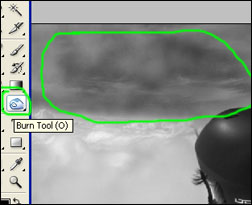 So how do we use the ‘Dodging & Burning’ technique? Firstly open your picture in a digital editing program and find the Dodging & Burning Tool. You might like to use the programs ‘auto contrast’ or ‘one click fix’ button first. This may just improve your image slightly before you start the dodging and burning. Its normally a good idea to let the program balance your image first in this way.
If you are able, it will be useful be to print a copy of your image first and mark the areas you want to enhance. A paper copy is easier to work with than the on screen version. Mark the areas of the printed version that are highlights and shadow. When Dodging & Burning you are trying to increase the contrasts in the picture, so having lots of grey areas isn’t the desired effect. Also do not overkill the area selections.
 Choose a few areas you think could be improved, but be selective. Dodging & Burning should be very subtle so use no more than 6% opacity on the brush, and be sure to use lots of sweeping strokes to keep the effect even and blended. Using large brushes helps too, around 400 to 500 diameter soft brushes are best. The opacity and brush settings are variable in all editing programs that allow dodging and burning, so don’t worry if your not sure what this means.
You’ll spot them when you select the dodge and burn tool. Most importantly, remember to only ever ‘dodge’ highlights and only ever ‘burn’ mid-tones and shadows. If you try to burn highlights you’ll end up with a horrible dirty grey result, and dodging shadows and mid-tones only creates noise in the image, neither of which looks good.
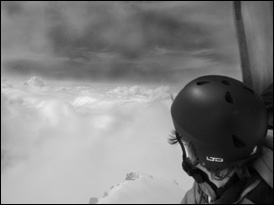 Using the subtle settings mentioned above, apply the Dodging & Burning tool to the image ONLY on the areas you previously chose on the paper copy. Please don’t get carried away with this as the final result will look harsh and artificial! Stick to the areas you chose and then once your done, print the image! Photo-paper and high quality printer settings will display your hard work best.
You may not notice too much difference..until you place your final print next to the original print. You’ll be amazed at the improvement! Finally, this is a guide to standard ‘Dodging & Burning’ but as with every aspect of digital photography, experiment for your self!
Try different images, try different opacities and try different brush types! The more you experiment and practice, the better you’ll become, and the better you’ll be at identifying areas of images that would benefit most from a little Dodging & Burning!
About the Author
Visit Your-Digital-Photography Tutorials for more free digital photographyTips, Tricks & Tutorials, including new Photoshop Video Tutorials!
Like This Article?
Don't Miss The Next One!
Join over 100,000 photographers of all experience levels who receive our free photography tips and articles to stay current:



Leave a Reply