For many smartphone photographers, Live Photos are one of those features that get turned on by accident and forgotten about entirely.
After all, if you’re trying to take a still photograph, why would you want a tiny video attached to every image?
The truth is that Live Photos can be surprisingly useful—and even creative—when you know how to take advantage of them.
Instead of thinking of Live Photos as short videos, think of them as a way to capture a few extra moments before and after you press the shutter. Those extra moments can open up several creative possibilities that ordinary photos simply can’t provide.
Relevant: only a little while left for the Smartphone Photography Guide ☀️ Summer Sale
Capture the Perfect Expression
Anyone who has photographed children, pets, or groups of people knows how difficult it can be to capture the perfect facial expression.
Someone blinks.
Someone looks away.
A smile appears a fraction of a second too late.
With Live Photos, your phone records a brief sequence of frames surrounding the moment you take the picture. This allows you to choose a different frame afterward if the exact shutter moment wasn’t ideal.
That means you can often rescue a photo that would otherwise be unusable.
Create Long Exposure Effects
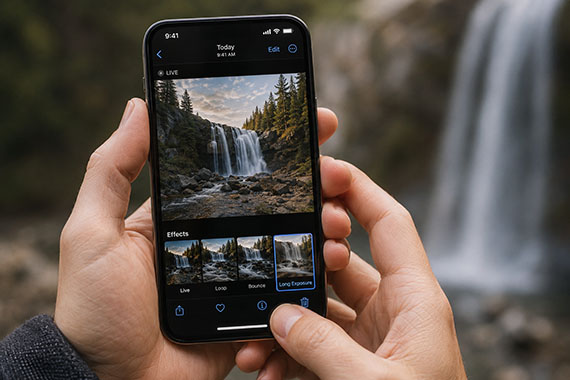
One of the most powerful—and least known—Live Photo features is the ability to create long exposure effects.
When viewed in the Photos app on an iPhone, a Live Photo can be transformed into a simulated long exposure image with a simple swipe and effect selection.
This works particularly well for:
- Waterfalls
- Moving streams
- Ocean waves
- Traffic trails
- Carnival rides
- Water fountains
While it won’t completely replace a tripod and dedicated camera setup, it can produce surprisingly attractive results directly from your smartphone.
Turn Ordinary Moments Into Motion Images
Sometimes a still image doesn’t fully capture the feeling of a scene.
A flag waving in the wind.
Leaves rustling on a trail.
A child blowing out birthday candles.
A dog excitedly running toward the camera.
These moments often feel more alive when viewed as a Live Photo rather than a frozen frame.
Instead of sharing a traditional image, consider sharing the Live Photo itself when the motion helps tell the story.
Create Looping Animations
Live Photos can also be converted into looping animations.
The Loop effect continuously repeats the captured motion, creating an eye-catching result that often feels more engaging than a static image.
Some subjects work particularly well:
- Flowing water
- Escalators
- Ferris wheels
- Spinning objects
- Moving clouds
- Street scenes
The key is finding motion that naturally repeats itself.
Add Energy With Bounce
Another creative effect available in the Photos app is Bounce.
Rather than looping continuously in one direction, Bounce plays the motion forward and backward repeatedly.
This effect can create fun and playful results with:
- Jumping subjects
- Sports action
- Pets
- Children
- Amusement park rides
Used sparingly, Bounce can make ordinary moments feel more dynamic and entertaining.
Improve Your Timing
Many photographers treat Live Photos as a safety net.
Because multiple frames are being recorded, you often have a better chance of capturing the decisive moment.
This can be particularly useful when photographing:
- Birds taking flight
- Street photography moments
- Action scenes
- Fast-moving children
- Pets
Instead of relying entirely on perfect timing, Live Photos give you a small buffer that can help save the shot.
When Not to Use Live Photos
Despite their benefits, Live Photos aren’t always the best choice.
You may want to disable them when:
- Storage space is limited
- Shooting large numbers of images
- Capturing long bursts of action
- You specifically want maximum battery life
Since each Live Photo stores additional image data, they consume more storage than traditional still photographs.
Live Photos are often dismissed as a gimmick, but they’re actually a surprisingly versatile creative tool.
Whether you’re rescuing a missed expression, creating long exposure effects, generating looping animations, or simply capturing a little more life in your images, Live Photos can add possibilities that standard photographs can’t.
The next time you’re tempted to turn the feature off, try experimenting with it instead. You may discover that those few extra seconds before and after the shutter click can lead to some of your most interesting smartphone photos.
For Further Training:
The Summer Sale ☀️ on the Smartphone Photography Guide is wrapping up soon, and it’s a great chance to finally unlock what your phone camera can really do.
The guide walks through real, usable techniques—manual controls, motion blur, low-light shooting, and creative effects—so you’re not just relying on auto mode and luck. If this post helped, the guide goes much deeper.
Deal ending soon: Smartphone Photography Guide ☀️ Summer Sale
Like This Article?
Don't Miss The Next One!
Join over 100,000 photographers of all experience levels who receive our free photography tips and articles to stay current:





Leave a Reply