Zooming on a smartphone feels effortless. You pinch the screen, the subject gets closer, and the camera does the rest. But what actually happens when you zoom isn’t as simple as it looks—and it explains why zoomed-in phone photos often lose detail, look noisy, or feel overly processed. Once you understand what your phone is doing behind the scenes, you can make better choices about when to zoom and when to avoid it.
Smartphone zoom generally falls into three categories: optical zoom, digital zoom, and computational (or hybrid) zoom. Which one your phone uses depends on how far you zoom, the lenses built into your phone, and the lighting conditions at the time.
Relevant reminder: only 1 day left for the Smartphone Photo Guide New Year Offer 🎉
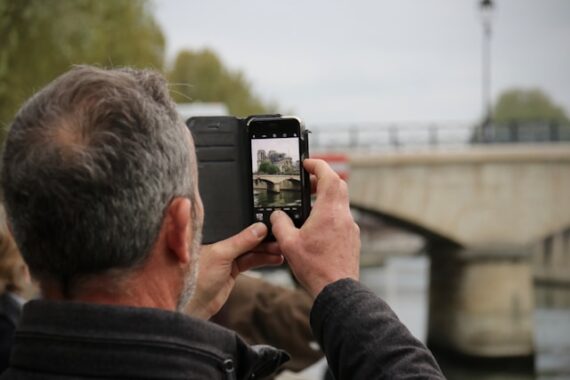
Photo captured by Fabien Maurin
Optical Zoom: Real Reach, Real Detail
Optical zoom is the best-case scenario. This happens when your phone switches to a dedicated telephoto lens—often labeled 2×, 3×, or 5×. Instead of cropping the image, the camera is physically using a lens designed to see farther away. Because of that, image quality stays intact. You keep full resolution, clean detail, and more natural textures.
The limitation is that optical zoom only works at specific magnifications. If your phone has a 3× lens, you get true optical quality at exactly 3×. As soon as you zoom a little more or a little less, the phone has to start blending in digital and computational tricks. That’s why images often look their best at those “native” zoom levels.
Digital Zoom: Cropping in Real Time
Digital zoom is what kicks in when your phone doesn’t have a lens that matches the zoom level you’ve chosen. Instead of moving glass, the camera simply crops into the image and enlarges what remains. No new detail is captured—you’re just stretching fewer pixels to fill the frame.
At low zoom levels in bright light, this can look acceptable. But as you zoom farther, quality drops quickly. Fine textures disappear, noise becomes more visible, and sharpening artifacts start to show up. By the time you reach extreme zoom levels, the image may look soft, crunchy, or smeared, especially on larger screens.
Digital zoom isn’t useless, but it’s limited. It works best when light is abundant and the subject doesn’t rely on fine detail.
Computational Zoom: The Phone Starts Guessing
Modern smartphones lean heavily on computational photography to make zoomed images look better than they technically should. When you zoom beyond a native lens, your phone may combine data from multiple lenses, merge several frames, and use AI-based processing to rebuild detail.
This is why zoomed photos can sometimes look surprisingly good at first glance. The phone is analyzing patterns and making educated guesses about what the scene should look like. The problem is that these guesses aren’t always accurate. You may notice waxy textures, strange repeating details, or overly sharp edges that don’t look natural. The farther you zoom, the more the camera is inventing rather than recording.
Why Zoom Gets Worse in Low Light
Zoom magnifies everything—including problems. When you zoom in low light, less light reaches the sensor, forcing the camera to raise ISO and slow the shutter speed. Noise increases, motion blur becomes more likely, and computational processing ramps up aggressively to compensate.
That’s why a zoomed photo taken in bright daylight can look fine, while the same shot at dusk or indoors falls apart. In low light, zoom leaves very little margin for error, especially when shooting handheld.
Zooming vs. Cropping Later
One of the most counterintuitive tips in smartphone photography is that it’s often better to shoot wide and crop later rather than zoom in-camera—especially if you’re relying on digital zoom. Shooting wide preserves the full-resolution image and avoids extra processing. Cropping later gives you more control over how much detail you sacrifice.
Optical zoom is still worth using when it’s available. But if you’re unsure whether your phone is using real zoom or digital tricks, capturing the full image and cropping afterward is usually the safer choice.
The Bottom Line
When you zoom on a smartphone, you’re not just getting closer—you’re changing how the camera captures and processes the image. Optical zoom preserves detail. Digital zoom discards it. Computational zoom tries to fill in the gaps with educated guesses.
Knowing which type of zoom your phone is using, and when, helps you decide whether to zoom, step closer, or crop later. That awareness alone can dramatically improve the quality of your smartphone photos—without changing anything about your camera at all.
For Further Training, Offer Ending Soon:
The New Year Flash Sale 🎉 on the Smartphone Photography Guide is wrapping up soon, and it’s a great chance to finally unlock what your phone camera can really do.
The guide walks through real, usable techniques—manual controls, motion blur, low-light shooting, and creative effects—so you’re not just relying on auto mode and luck. If this post helped, the guide goes much deeper.
Only 1 day left: Smartphone Photography Guide New Year 🥳 Flash Sale
Like This Article?
Don't Miss The Next One!
Join over 100,000 photographers of all experience levels who receive our free photography tips and articles to stay current:





Leave a Reply