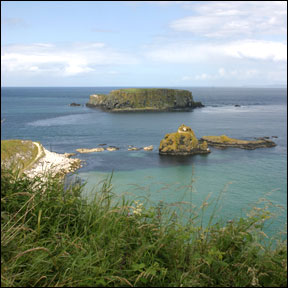
Before Changes
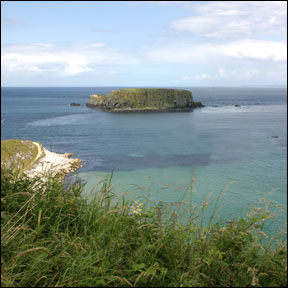
After Changes
This tutorial is to help you learn how to remove unwanted items from a photo using the Clone Stamp Tool. For this photo (in order to simplify it and draw more attention to the main island) I removed the chain of little islands. Once you have your photo open in photoshop:
1. Select the Clone Stamp Tool from the toolbar, pick a good sized brush and set the opacity to about 95%.
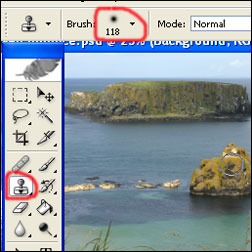
2. Hold alt and click somewhere to take a good sample. (Wherever you take a sample, that’s what your going to be drawing in place of the removed object).

3. Release alt and carefully click and drag the mouse over the item you wish to remove. (You will notice that the spot where you took the sample will follow your movements).

4. Continue to repeat steps 2 and 3 until the unwanted object is completely gone. You might have to change techniques a little based on available places to take a good sample. With practice this tool is very valuable.
Completed Photo
Like This Article?
Don't Miss The Next One!
Join over 100,000 photographers of all experience levels who receive our free photography tips and articles to stay current:




Hello dear
I read the post and I have learned more things about object remove in Photoshop. It is a nice post for Photoshop beginner person. I have a question as well. How can I understand the type of Remove object in Photoshop? If I want to hire someone for my photo editing work, how will I offer the price for it? If you let me know about the complicity of Photoshop remove object, I will be very happy.
Thanks
Wonderful Post. I appreciate your blog. Well done for shared. Really useful resource! Thanks for sharing.
Thanks for the help
I liked this article. We also do this kind of editing but this article shows how a beginner can also do it.
After working on several photos on photoshop the PS stap appeared in the lower left corner. I can turn it off before I file the hoot. Any help.
thanks that helped alot
Photo Eraser is a nice tool for mac, ipad ,iphone
great tips. thank you!
thanks for the great explanation. Finally managed to do what I wanted in Photoshop.
Great post, both for beginners and photoshop old hands. I’ve always found that Photoshop is immensely difficult for beginners to pick up but it also has so much depth to it that even old hands like me find so many incredible techniques out there that I don’t know about. Excellent post bringing together loads of tutorials. Nice one.
Interesting work!!! i loved this! well done the writer
thank you very much for helping me. i have been wondering on how to remove unwanted image. i have benefited in your explanation
Thank you so much. MAKE MY LIFE EASY!!!!!!
Thanks a lot :)
Never thought it was that easy lol
THANKS :)
Hello. I downloaded a pdf in Photoshop and i was trying to erase things but i discovered that i do not have the permission to this.Can you tell me what can I do? Thank you
Thank you! New to the business and still learning so this was very helpful and simple to understand!
thnx…..simple n easy to understand
what version of photoshop is this?
i tried using this tool and still cant figure it out
Melissa, will take some time and practice and from my experience the method (size, strokes) that works great on one asset may not work as well on the next.
Thanks a bunch, was totally stumped and now my photo looks brilliant!
Hard with horse hair though
Works great, thanks!
Thank you very much for easy and fast way to do it! Excellent article!
Thanks for a simple and easy way to do this. I sorted what i needed in less than 5 minutes! Wow!
Thanks for taking the time to do this guide!
Elin
Thanks a lot. Been wondering how to remove unwanted objects from photos for ages. Your explanation is super easy to understand. Thanks for sharing.
Thank you so much for this guide! I have been trying to figure out how to do this type of thing forever!
Thanks from my friends as well!