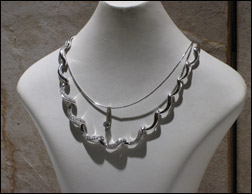
Without Shine Effect
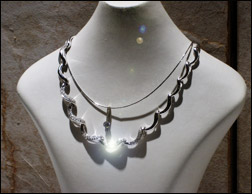
With Shine Effect
This tutorial is to help you learn how to add a sparkle to someone’s jewelry in any photo. This technique can add a little something extra if you are making any sort of special effects picture. Ok, once you have your picture open in photoshop:
1. Make a copy of the Background Layer, so you have two layers with the exact same photo on them (Layer>Duplicate Layer).
2. On the bottom layer (Background), Apply a Lens Flare Filter (Filter>Render>Lens Flare). For this photo I used the following Options:
3. In the Lens Filter Dialog Box, move the lens flare over the spot where you want it. Adjust the Brightness to about 79. And select the 105mm Prime Lens Type.

When you click OK, don’t be worried if you don’t see the flare because the top layer is blocking it from being seen.
4. In order to make the sparkle look more realistic, select the top layer (the duplicate layer you created in step 1), and set the Layer’s Blend Mode to Soft Light.

For different photos, the process and amount of adjustment won’t be exactly the same. But you can apply this technique to any photo that has any kind of jewelry in it.
Like This Article?
Don't Miss The Next One!
Join over 100,000 photographers of all experience levels who receive our free photography tips and articles to stay current:





Gooooooooooooood! Thank you.
:-D
fantastic instructions, helped me get it first time. thank you!
Finally a tutorial that explains well. Thank you very much.
Thanks – this is just the tutorial I was looking for. In fact, I’ve been looking for quite some time.
Great instructions right up to he end. I’m new a cs4 bu I have boh layers completed and the picture doesnt look any different even though each step worked along the way. I’m thinking that I need to do something to finish the process…are there directions missing?
Thanks